
Shoota Join the waitlist

One shot anything.

Shoota is a capture tool for the Mac. Click the thing you mean, or just say what is wrong and Shoota finds the things you named. Every note knows which button, field or line of text it is on, so the agent or teammate you hand it to gets it right the first time.

Join the Waitlist Early release coming soon. macOS first; Windows and Linux to follow.
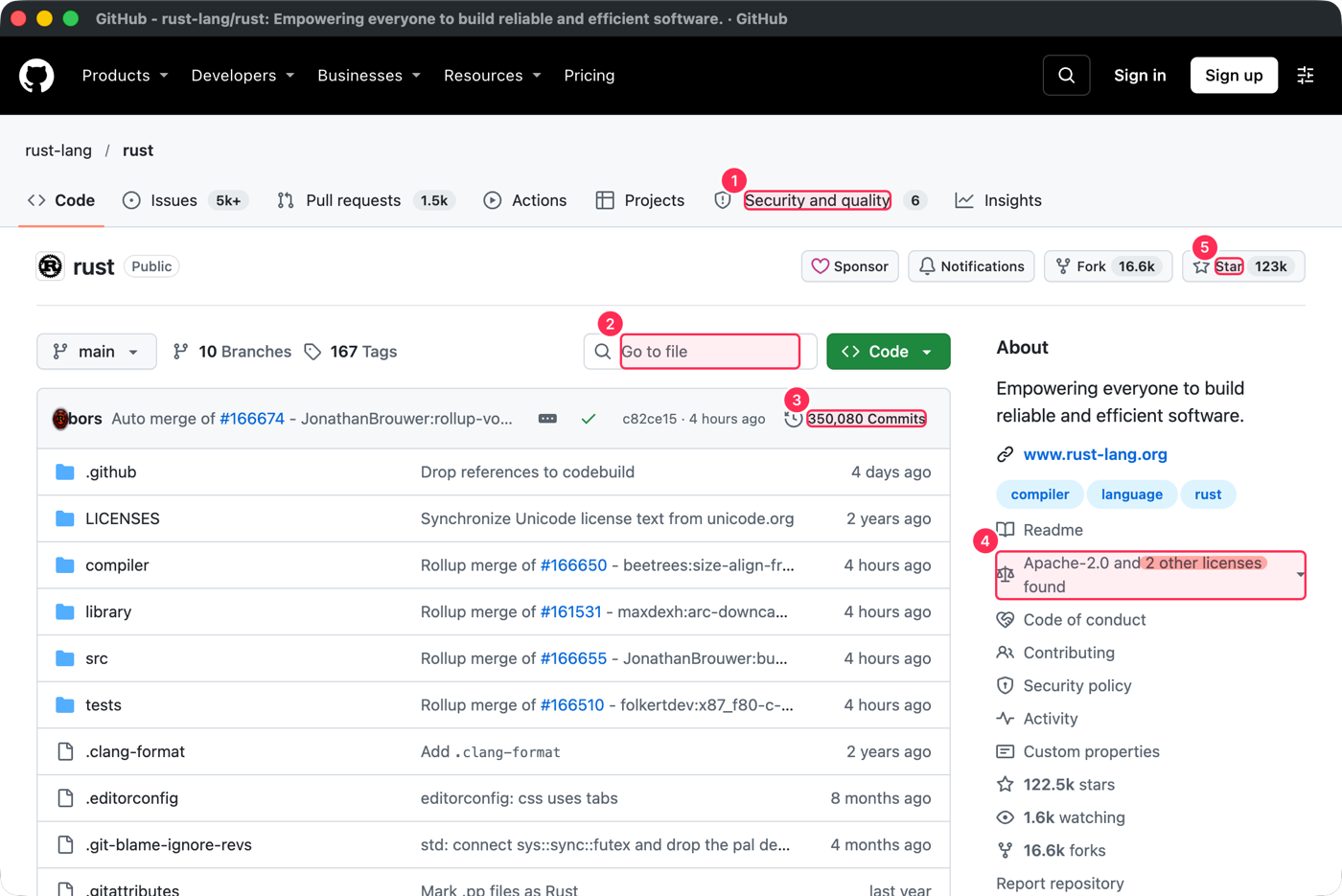
A GitHub repository page with five numbered red pins, each beside an outlined part of the page: a tab, the file search field, the commit count, the license line and the Star button.
A public repository page with five suggestions. Each one names the tab, field or line it is on.

Named, described and tagged on the Mac by a local model: github-rust-lang-repository-file-list · chromium, github, repository, rust-lang, source-code, web-browser

What your agent reads

## 1. The longest tab by far. Would "Security" do?
- Intent: question; severity: suggestion; status: open
- Element: text "Security and quality"
- Looks like: Text "Projects • Security and quality 6" at the top center of the capture, next to "Sponsor"
- Box: [1310, 336, 1566, 368] (pin at [1438, 352])
- Inside: GitHub - rust-lang/rust: Empowering everyone to build reliable and efficient software. · GitHub > Global navigation menu > Repository
- Near: "Sponsor", "A Notifications", "‹> Code -", "Q Go to file"
- Code hints: accessibility role `AXStaticText`
- Found by: hybrid (confidence 0.95)
## 2. Show the shortcut (t) inside the field, the way the search box does.
- Intent: change; severity: suggestion; status: open
- Element: combobox "Go to file"
- Looks like: White field or row labeled "Q Go to file" at the center of the capture, under "rust", next to "c82ce15.4 hours ago"
- Box: [1092, 588, 1406, 648] (pin at [1248, 618])
- Inside: GitHub - rust-lang/rust: Empowering everyone to build reliable and efficient software. · GitHub
- Under heading: "rust"
- Near: "c82ce15.4 hours ago", "350,080 Commits", "Drop references to codebuild", "Sponsor"
- Code hints: classes `prc-components-Input-IwWrt`; accessibility role `AXComboBox`
- Found by: hybrid (confidence 0.95)
## 3. Could this open the history in a side panel instead of leaving the page?
- Intent: question; severity: suggestion; status: open
- Element: text "350,080 Commits"
- Box: [1420, 722, 1628, 750] (pin at [1577, 736])
- Inside: GitHub - rust-lang/rust: Empowering everyone to build reliable and efficient software. · GitHub
- Code hints: accessibility role `AXStaticText`
- Found by: accessibility (confidence 0.95)
## 4. Name all three here. "2 other licenses found" makes me click to find out.
- Intent: change; severity: suggestion; status: open
- Element: combobox "Apache-2.0 and 2 other licenses found"
- Looks like: Text "Apache-2.0 and 2 other licenses" at the middle right of the capture, under "•github", next to "Code of conduct"
- Text on it: "Apache-2.0 and 2 other licenses"
- Box: [1752, 970, 2296, 1054] (pin at [2117, 990])
- Inside: GitHub - rust-lang/rust: Empowering everyone to build reliable and efficient software. · GitHub
- Under heading: "•github"
- Near: "Code of conduct", "M Readme", "language", "found"
- Code hints: id `_R_3ollahlik5_`; classes `licensesTrigger__fTrdA_`; accessibility role `AXPopUpButton`
- Found by: hybrid (confidence 0.95)
## 5. The button and its count read as one control. Is the number its own link?
- Intent: question; severity: suggestion; status: open
- Element: text "Star"
- Box: [2138, 454, 2186, 482] (pin at [2161, 468])
- Inside: GitHub - rust-lang/rust: Empowering everyone to build reliable and efficient software. · GitHub
- Code hints: accessibility role `AXStaticText`
- Found by: accessibility (confidence 0.95)
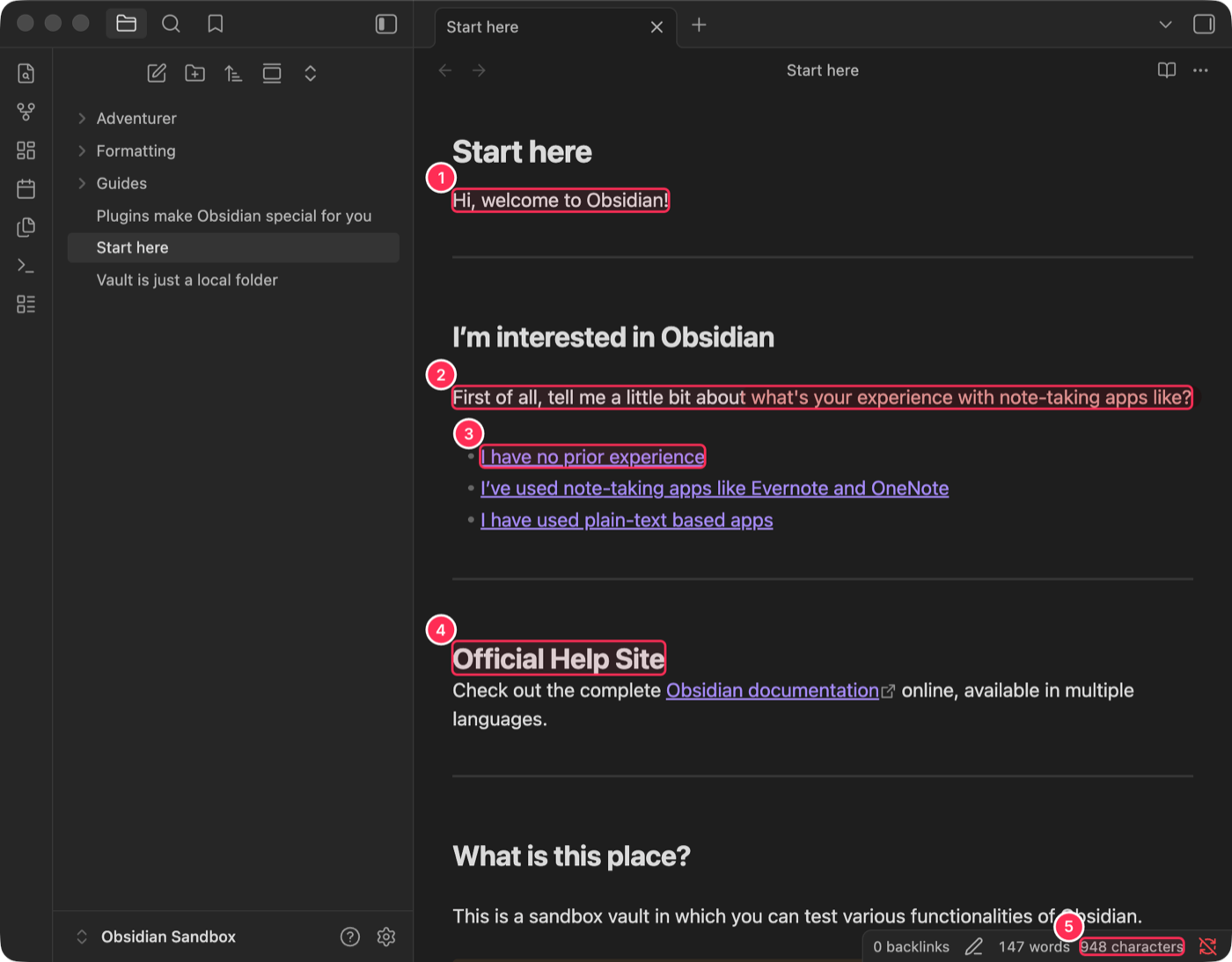
Obsidian showing a note, with five numbered red pins beside outlined lines of text and one phrase highlighted.
Copy changes on a note, with the phrase in question highlighted. The words come from the app itself.

Named, described and tagged on the Mac by a local model: obsidian-start-here-note-sandbox-vault · obsidian, note-taking, sandbox-vault, start-here-page, documentation-links

What your agent reads

## 1. Say in this line what Obsidian is, for someone opening it for the first time.
- Intent: change; severity: suggestion; status: open
- Element: text "Hi, welcome to Obsidian!"
- Looks like: Text "Hi, welcome to Obsidian!" at the top center of the capture, under "Start here", next to "I'm interested in Obsidian"
- Box: [752, 314, 1112, 352] (pin at [931, 332])
- Inside: Start here - Obsidian Sandbox - Obsidian 1.12.7
- Under heading: "Start here"
- Near: "I'm interested in Obsidian", "→", "First of all, tell me a little bit about what's your experi…", "Plugins make Obsidian special for you"
- Code hints: accessibility role `AXStaticText`
- Found by: hybrid (confidence 0.95)
## 2. Reads oddly. Try: "First, what is your experience with note-taking apps?"
- Intent: change; severity: suggestion; status: open
- Element: text "First of all, tell me a little bit about what's your experience with note-taking apps like?"
- Looks like: Text "First of all, tell me a little bit about what's your experience with note-taking apps like?" at the center of the capture, under "I'm interested in Obsidian", next to "• I've used note-taking apps like Evernote and OneNote"
- Box: [752, 642, 1982, 680] (pin at [1100, 660])
- Inside: Start here - Obsidian Sandbox - Obsidian 1.12.7
- Under heading: "I'm interested in Obsidian"
- Near: "• I've used note-taking apps like Evernote and OneNote", "• Lhave used plain-text based apps", "• Lhave no prior experience", "Hi, welcome to Obsidian!"
- Code hints: accessibility role `AXStaticText`
- Found by: hybrid (confidence 0.95)
## 3. These three are choices, not pages to read. Could they be buttons?
- Intent: question; severity: suggestion; status: open
- Element: text "I have no prior experience"
- Looks like: Text "• Lhave no prior experience" at the center of the capture, under "First of all, tell me a little bit about what's your experience with note-takin…", next to "• I've used note-taking apps like Evernote and OneNote"
- Box: [798, 740, 1172, 778] (pin at [983, 760])
- Inside: Start here - Obsidian Sandbox - Obsidian 1.12.7
- Under heading: "First of all, tell me a little bit about what's your experience with note-takin…"
- Near: "• I've used note-taking apps like Evernote and OneNote", "First of all, tell me a little bit about what's your experi…", "• Lhave used plain-text based apps", "I'm interested in Obsidian"
- Code hints: accessibility role `AXStaticText`
- Found by: hybrid (confidence 0.95)
## 4. Sentence case like the other headings: "Official help site".
- Intent: change; severity: suggestion; status: open
- Element: text "Official Help Site"
- Looks like: Heading "Official Help Site" at the bottom center of the capture, under "First of all, tell me a little bit about what's your experience with note-takin…", next to "Check out the complete Obsidian documentationt online, avai…"
- Box: [752, 1066, 1106, 1122] (pin at [927, 1096])
- Inside: Start here - Obsidian Sandbox - Obsidian 1.12.7
- Under heading: "First of all, tell me a little bit about what's your experience with note-takin…"
- Near: "Check out the complete Obsidian documentationt online, avai…", "languages.", "• Lhave used plain-text based apps", "• I've used note-taking apps like Evernote and OneNote"
- Code hints: accessibility role `AXStaticText`
- Found by: hybrid (confidence 0.95)
## 5. Could this show reading time as well?
- Intent: question; severity: suggestion; status: open
- Element: text "948 characters"
- Box: [1796, 1560, 1968, 1588] (pin at [1812, 1575])
- Inside: Start here - Obsidian Sandbox - Obsidian 1.12.7
- Code hints: accessibility role `AXStaticText`
- Found by: accessibility (confidence 0.95)
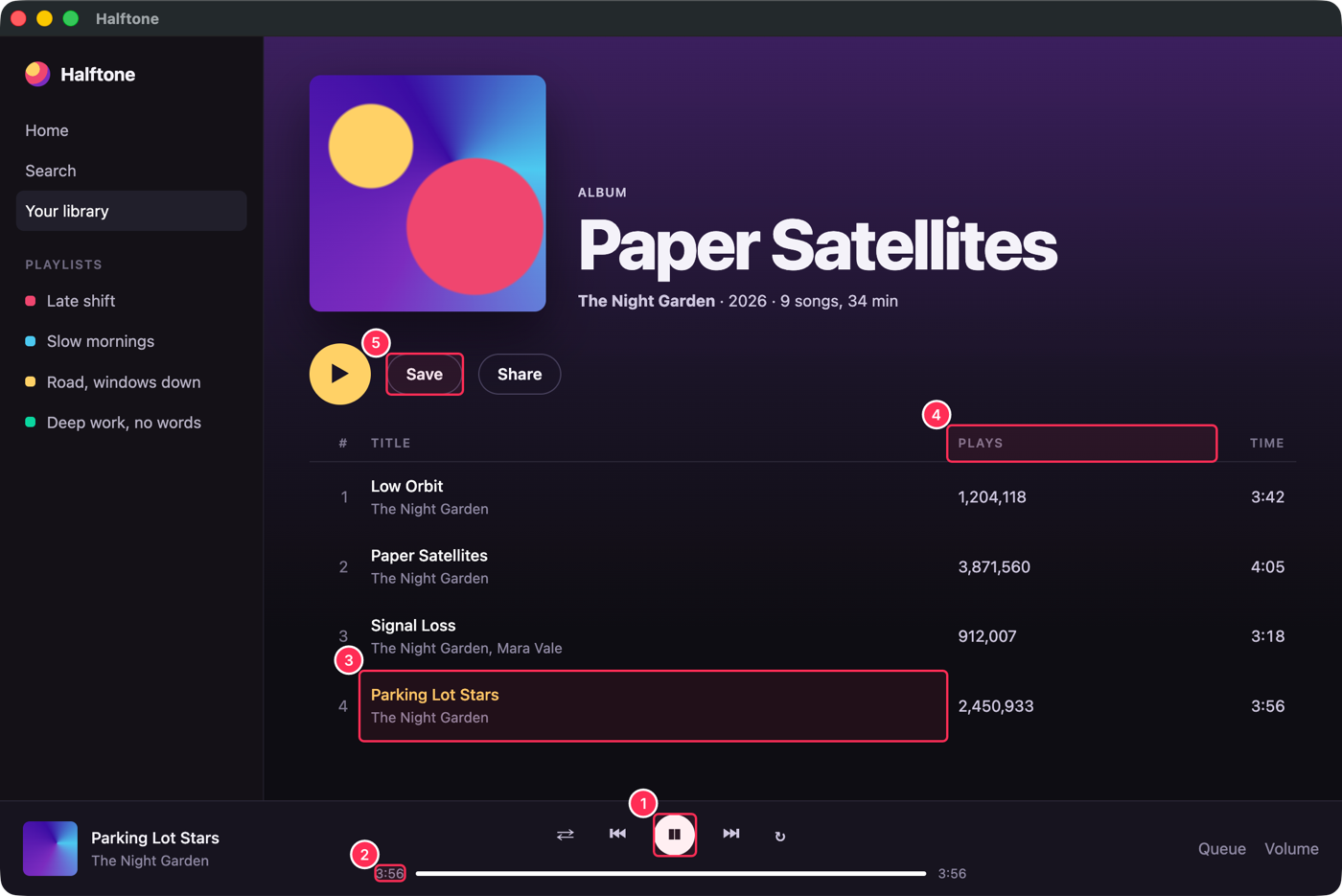
A music player on an album page with five numbered red pins: on the Pause button, the elapsed time, the playing track, a column heading and the Save button.
Five notes on one screen. The Pause button has no words on it; Shoota names it from the app.

Named, described and tagged on the Mac by a local model: paper-satellites-album-page-music-app · chromium, music-player, album-page, the-night-garden, paper-satellites

What your agent reads

## 1. Still shows Pause after the last track ends. It should go back to Play.
- Intent: fix; severity: important; status: open
- Element: button "Pause"
- Looks like: Small white control with no text at the bottom center of the capture, under "Parking Lot Stars", next to "The Night Garden, Mara Vale"
- Box: [1150, 1432, 1224, 1506] (pin at [1186, 1469])
- Inside: Halftone
- Under heading: "Parking Lot Stars"
- Near: "The Night Garden, Mara Vale", "The Night Garden", "3:56", "Signal Loss"
- Code hints: classes `pause`; accessibility role `AXButton`
- Found by: hybrid (confidence 0.95)
## 2. Elapsed time should go back to 0:00 when the album ends.
- Intent: fix; severity: important; status: open
- Element: text "3:56"
- Looks like: Text "3:56" at the bottom left of the capture, under "Parking Lot Stars", next to "The Night Garden"
- Box: [660, 1522, 712, 1550] (pin at [685, 1537])
- Inside: Halftone
- Under heading: "Parking Lot Stars"
- Near: "The Night Garden", "4", "The Night Garden, Mara Vale", "3"
- Code hints: accessibility role `AXStaticText`
- Found by: hybrid (confidence 0.95)
## 3. Keeps its playing color after playback has stopped.
- Intent: fix; severity: important; status: open
- Element: cell "Parking Lot Stars"
- Looks like: Text "Parking Lot Stars" at the bottom left of the capture, under "Signal Loss", next to "The Night Garden"
- Box: [632, 1180, 1666, 1304] (pin at [1149, 1222])
- Inside: Halftone
- Under heading: "Signal Loss"
- Near: "The Night Garden", "The Night Garden, Mara Vale", "4", "3"
- Code hints: accessibility role `AXCell`
- Found by: hybrid (confidence 0.80)
## 4. Right-align this column so the numbers line up.
- Intent: change; severity: important; status: open
- Element: cell "PLAYS"
- Looks like: Text "PLAYS" at the middle right of the capture, under "• Deep work, no words", next to "1,204,118"
- Box: [1666, 748, 2140, 812] (pin at [1903, 780])
- Inside: Halftone
- Under heading: "• Deep work, no words"
- Near: "1,204,118", "3,871,560", "The Night Garden • 2026 • 9 songs, 34 min", "Paper Satellites"
- Code hints: accessibility role `AXCell`
- Found by: hybrid (confidence 0.80)
## 5. Once the album is saved, this should read Saved.
- Intent: change; severity: suggestion; status: open
- Element: button "Save"
- Looks like: Black button labeled "Save" at the middle left of the capture, under "•Slow mornings", next to "TITLE"
- Box: [680, 622, 814, 694] (pin at [746, 658])
- Inside: Halftone
- Under heading: "•Slow mornings"
- Near: "TITLE", "Share", "#", "Low Orbit"
- Code hints: classes `ghost`; accessibility role `AXButton`
- Found by: hybrid (confidence 0.95)
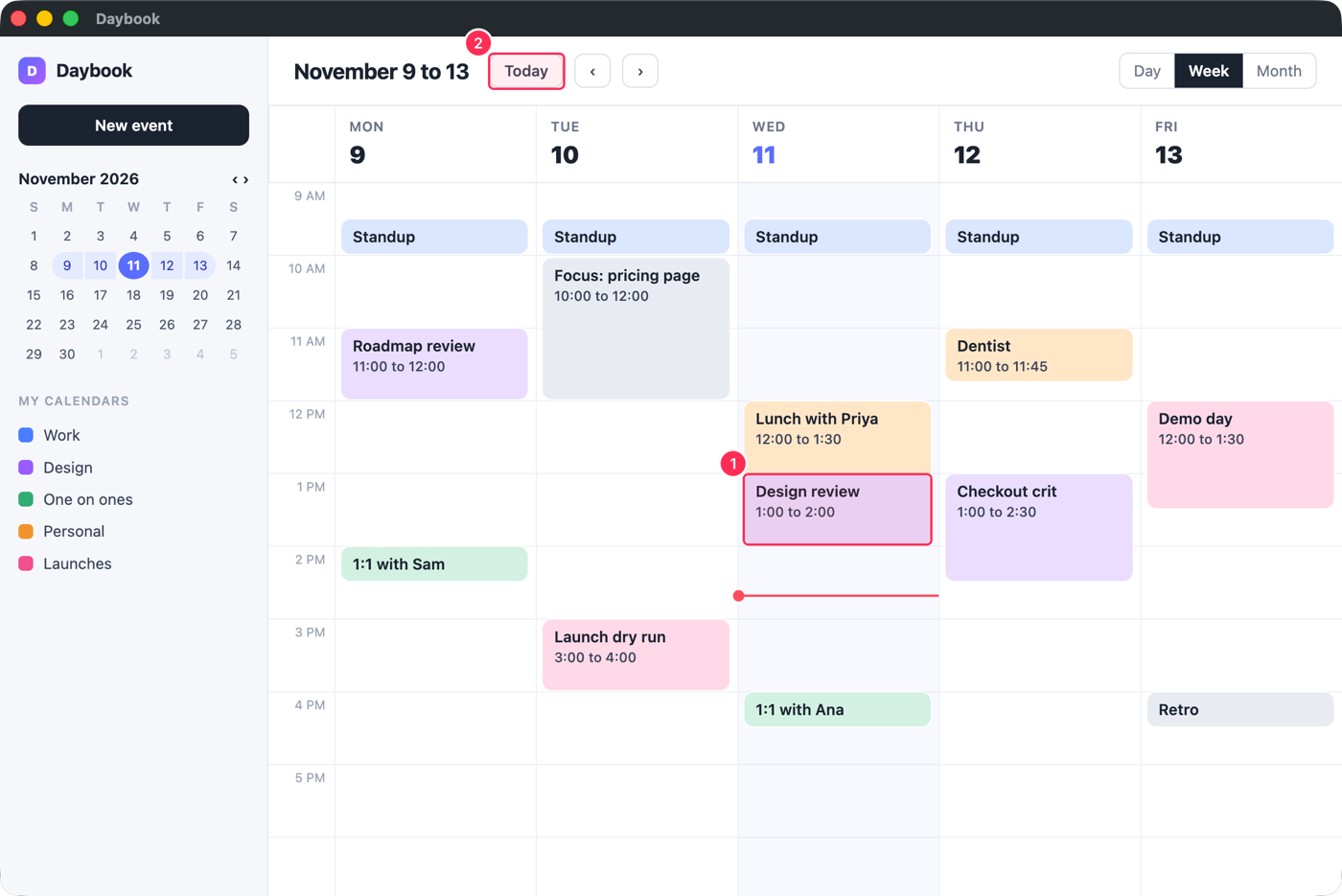
A week calendar with two numbered red pins: one beside an event that covers part of another, one beside the Today button.
Two notes on a week of sixteen events. The handoff says which event, and what is around it.

Named, described and tagged on the Mac by a local model: daybook-weekly-calendar-view-november · daybook, calendar, weekly-view, schedule, meetings, productivity

What your agent reads

## 1. This covers the last half hour of the lunch. Overlapping events should sit side by side.
- Intent: fix; severity: important; status: open
- Element: button "Design review, 1:00 to 2:00"
- Looks like: Text "Design review" at the center of the capture, under "Lunch with Priya", next to "1:00 to 2:00"
- Text on it: "Design review"
- Box: [1308, 834, 1638, 958] (pin at [1578, 865])
- Inside: Daybook
- Under heading: "Lunch with Priya"
- Near: "1:00 to 2:00", "12:00 to 1:30", "1:00 to 2:30", "Checkout crit"
- Code hints: classes `ev purple`; accessibility role `AXButton`
- Found by: hybrid (confidence 0.95)
## 2. This week is already showing, so Today should be disabled.
- Intent: change; severity: suggestion; status: open
- Element: button "Today"
- Looks like: Image at the top center of the capture, under "Daybook", next to "November 9 to 13"
- Box: [860, 94, 992, 156] (pin at [925, 124])
- Inside: Daybook
- Under heading: "Daybook"
- Near: "November 9 to 13", "TUE", "10", "MON"
- Code hints: accessibility role `AXButton`
- Found by: hybrid (confidence 0.95)
An issue tracker with three numbered red pins: beside a count, a cycle label and a tag.
A note on a single number, and two smaller suggestions.

Named, described and tagged on the Mac by a local model: tackboard-active-issues-storefront-dashboard · tackboard, dashboard, project-management, issue-tracking, storefront, active-issues

What your agent reads

## 1. This says 12, but five issues are listed under it. Count what is shown.
- Intent: fix; severity: important; status: open
- Element: text "12"
- Box: [706, 202, 736, 234] (pin at [720, 219])
- Inside: Tackboard
- Code hints: accessibility role `AXStaticText`
- Found by: accessibility (confidence 0.95)
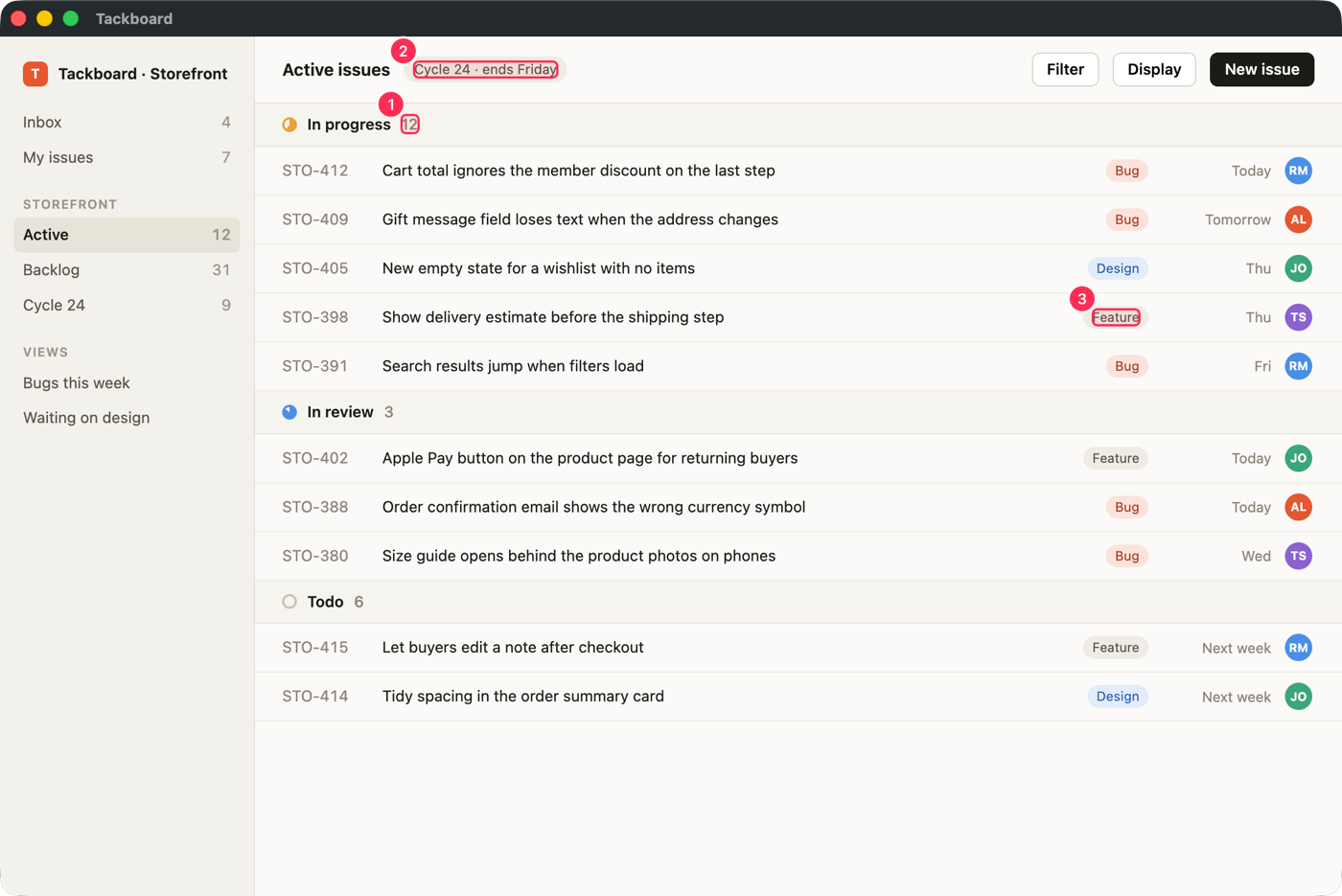
## 2. Say the date too: ends Fri, Nov 13.
- Intent: change; severity: suggestion; status: open
- Element: text "Cycle 24 · ends Friday"
- Looks like: Light gray button labeled "Cycle 24 . ends Friday" at the top center of the capture, next to "In progress 12"
- Box: [728, 108, 980, 136] (pin at [854, 122])
- Inside: Tackboard
- Near: "In progress 12", "Cart total ignores the member discount on the last step", "Active issues", "Gift message field loses text when the address changes"
- Code hints: accessibility role `AXStaticText`
- Found by: hybrid (confidence 0.95)
## 3. Feature has no color while Bug and Design do. Give it one.
- Intent: change; severity: suggestion; status: open
- Element: text "Feature"
- Looks like: Light gray button labeled "Feature" at the middle right of the capture, under "Backlog", next to "Design"
- Box: [1922, 544, 2004, 572] (pin at [1963, 558])
- Inside: Tackboard
- Under heading: "Backlog"
- Near: "Design", "Bug", "Tomorrow", "Thu"
- Code hints: accessibility role `AXStaticText`
- Found by: hybrid (confidence 0.95)

Point at an outlined element, or at a note beside it, to see what Shoota read there. Every picture is a Shoota capture, and the text beside it is the handoff Shoota wrote for that capture, word for word; it goes on to tell the agent how to find each element in the code and how to mark a note done. The music player, calendar and issue tracker are demo apps made for this page. GitHub and Obsidian are shown as anyone sees them; the notes on them are our own suggestions, and neither has any connection to Shoota.

A screenshot forgets what you meant

A box drawn on a picture says where, not what. Point at a button, a field or a line of text and click: Shoota reads which element it is from the app itself, and reads the pixels when the app says nothing. The pin goes beside it, never on top.

Typing it all out is slow

With a capture open, hold a key and say what should change. Your voice is written down on your Mac and a note lands on each thing you name; fix up the words and send it. Record your screen and talk, and each note carries what you were saying at that moment. Hold the same key in any other app and Shoota takes dictation there too.

The fix should take one pass

Copy for Agent gives a coding agent the image, the notes and the element behind each one. Agents answer and resolve notes from the command line or over MCP. A teammate gets one HTML file and can reply without an account.

Your captures should stay yours

Captures, recordings and voice notes are files on your disk. Speech becomes text on the device. A model running on your own Mac can name, describe and tag each capture; everything else works with no model at all, and nothing leaves your Mac unless you send it.

And the rest of a capture tool

  • Area, window and full screen
  • Scrolling capture
  • Timed capture for open menus
  • Copy text from anywhere on screen
  • Pin a capture above other windows
  • Screen recording
  • Arrows, boxes, text and blur
  • Backgrounds for sharing
  • Shortcuts you choose

Questions

Which apps does it work with?

Anything you can see on screen. Native Mac apps, apps built with web technology and pages in a browser tell Shoota what their buttons and text are. Where an app says nothing, Shoota reads the pixels: text by recognition, shapes by their edges.

Does anything leave my Mac?

No. Captures, recordings and voice notes are files on your disk, speech becomes text on the device, and naming uses a model running on your own Mac if you have one. Nothing is uploaded unless you send it somewhere yourself.

Do I need an AI model?

No. Notes, element names, the descriptions in a handoff and the handoff itself need none. A local model adds a file name, a one-line description and tags, so a capture is easy to find later.

What does my agent need?

Nothing special. A handoff is a picture and plain text, so any agent that reads Markdown can act on it. With the shoota command or its MCP server, an agent can also reply to a note and mark it done, and you see that in the capture.

What does it run on, and when?

The early release is for macOS 14 or later; writing down your voice needs macOS 26. Windows and Linux follow. Join the waitlist and you will hear once, when it is ready.

Early release coming soon.

macOS first; Windows and Linux to follow.